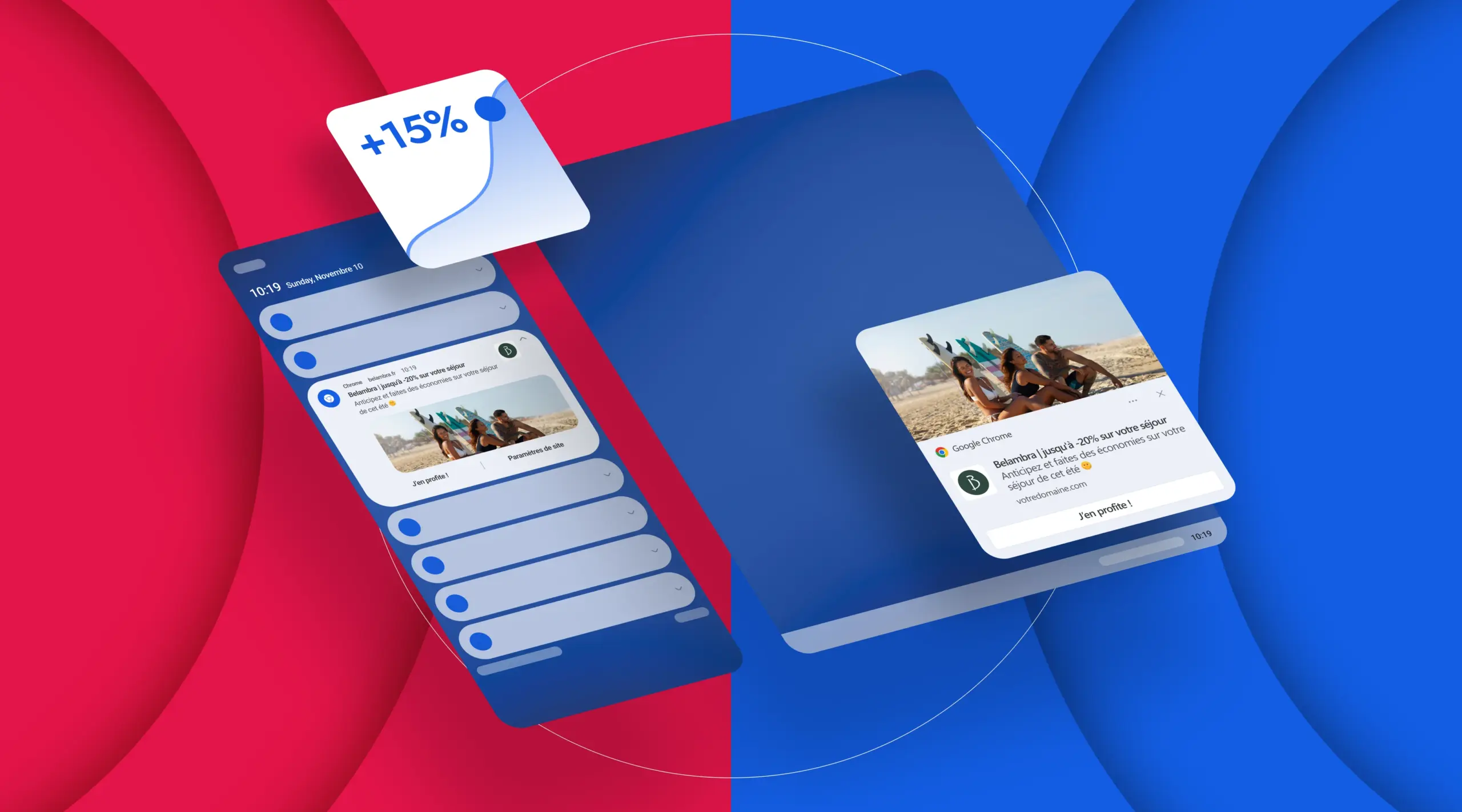
A push notification is a short, clickable message that appears directly on a user’s screen (smartphone or computer), even when the user is not using the application or website. Initially popularized by mobile applications, it is now also used by websites: it’s called “push notification web”.
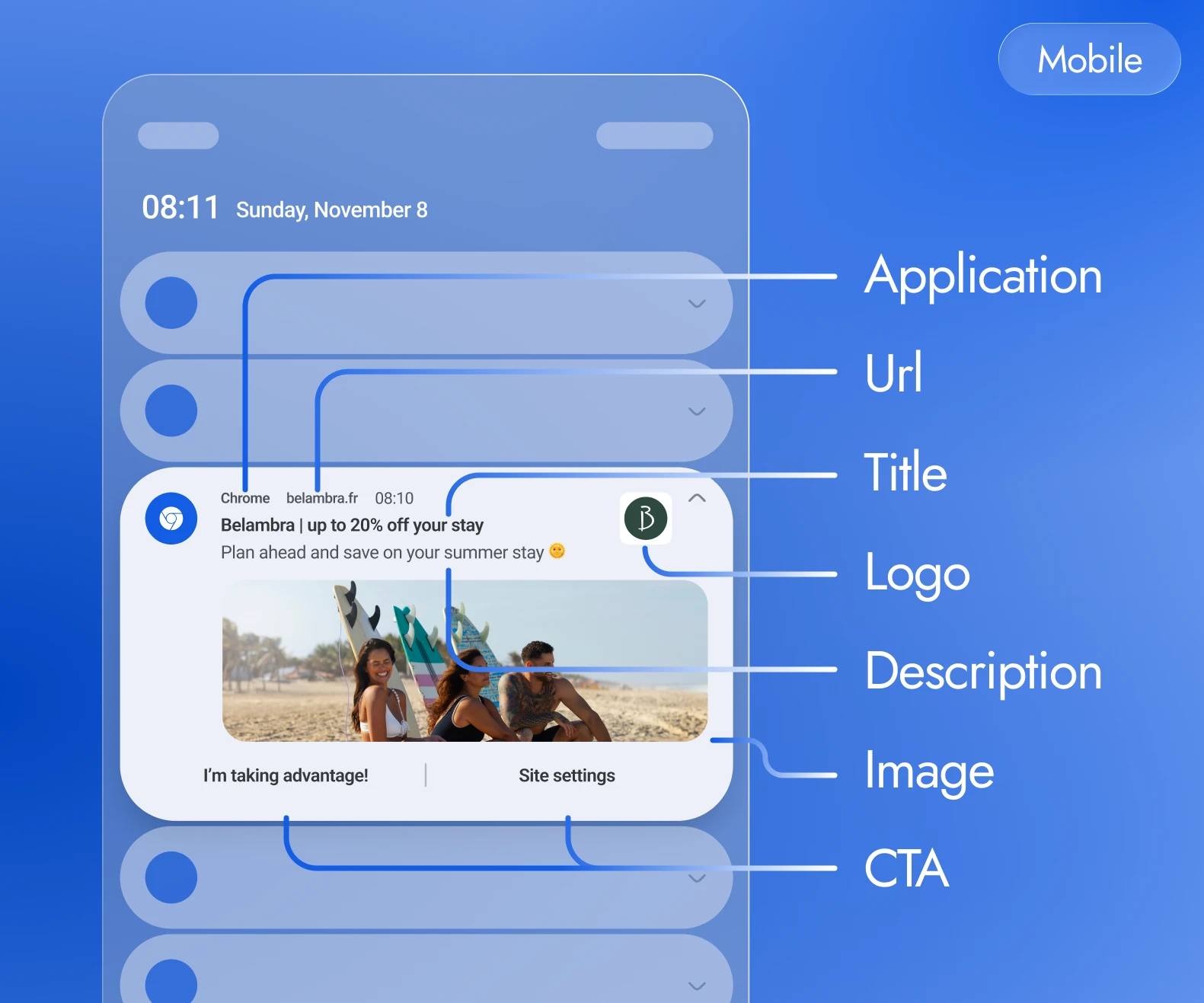
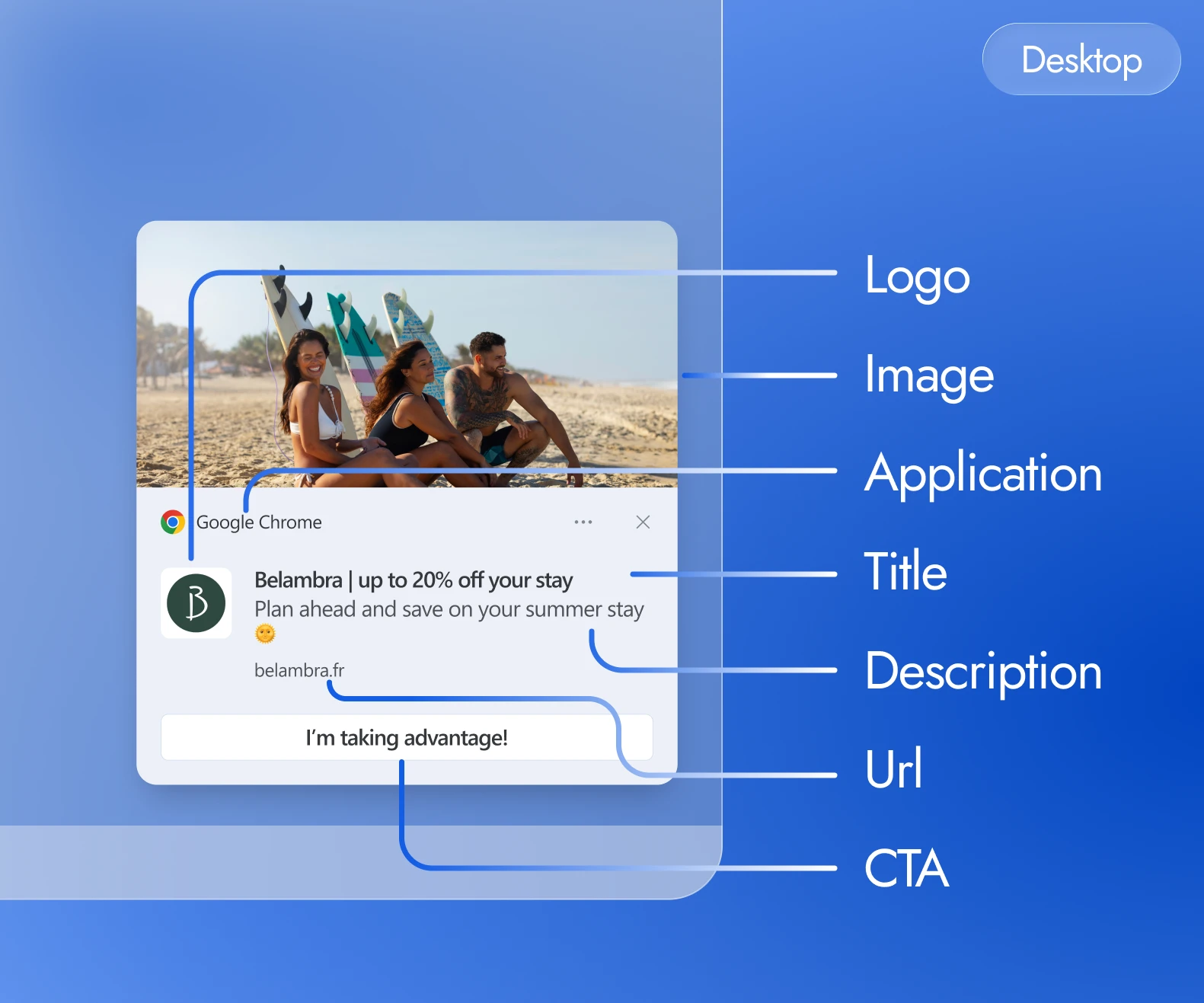
In concrete terms, a push notification consists of a logo (or icon), a title, a brief text, possibly an image, and sometimes one or more call-to-action (CTA) buttons.
The user can click on the notification to access the promoted content or offer. Its fundamental characteristic: it requires the user’s prior consent. This makes it a 100% RGPD-compliant channel that respects privacy.
- The main push notification families
- Main types of push notifications
- How do push notifications (App & Web) work?
- Why use web push notifications in your communications?
- The place of web push notifications in the conversion tunnel
- Examples of Web Push notifications for acquiring new prospects
- Examples of Web Push notifications for converting anonymous visitors into leads
- Examples of Web Push notifications for audience engagement and retention
- Examples of Web Push notifications for re-engaging and converting inactive users
- Examples of Web Push notifications for customer service and post-purchase retention
- Web Push Notification: the new innovative communication channel you need to try now
- Try out the Web Push revolutionNOW!
The main push notification families
Main types of push notifications
| Web Push Notification sent by a website after browser consent, designed to bring a visitor back outside the session. Web opt-in | App Push System notification sent by an installed app, designed to re-engage an acquired mobile base. Installed app | In-App Message displayed inside the open experience, useful for guiding or converting during an active session. In-session | CRM Push Web or app push enriched with customer data to trigger targeted, personalized scenarios. Customer data | |
|---|---|---|---|---|
| Potential reach | Web visitors who accepted opt-in | Installed app base | Active users | Identified opted-in customers |
| Supported platforms | Desktop, Android, iOS/iPadOS 16.4+ via home-screen web app | iOS / Android | In-App Overlay | Web or app via CRM/CDP |
| Opt-in required | Browser permission after user action | OS permission, with runtime request on Android 13+ | No notification opt-in | Push opt-in + CRM matching |
| Key KPIs | CTR, incremental visits | Open rate, re-engagement | Action rate, clicks, completion | CLV, reorder rate, repeat purchase |
| Main use case | Drive-to-store, promotion, traffic return | Retention, account info, useful alerts | Onboarding, cross-sell, short survey | VIP segments, birthdays, customer lifecycle |
| Limitations | Depends on browser support, permission and the iOS/PWA context | Requires an app, an SDK and sometimes an update | Visible only during an active session | Requires unified data and clear consent governance |
Web opt-in
Web Push
Notification sent by a website after browser consent, designed to bring a visitor back outside the session.- Reach
- Web visitors who accepted opt-in
- Supported platforms
- Desktop, Android, iOS/iPadOS 16.4+ via home-screen web app
- Opt-in
- Browser permission after user action
- KPI
- CTR, incremental visits
- Use case
- Drive-to-store, promotion, traffic return
- Limitations
- Browser support, permission and iOS/PWA context
Installed app
App Push
System notification sent by an installed app, designed to re-engage an acquired mobile base.- Reach
- Installed app base
- Supported platforms
- iOS / Android
- Opt-in
- OS permission, with runtime request on Android 13+
- KPI
- Open rate, re-engagement
- Use case
- Retention, account info, useful alerts
- Limitations
- App, SDK and sometimes an update required
In-session
In-App
Message displayed inside the open experience, useful for guiding or converting during an active session.- Reach
- Active users
- Supported platforms
- In-App Overlay
- Opt-in
- No notification opt-in
- KPI
- Action rate, clicks, completion
- Use case
- Onboarding, cross-sell, short survey
- Limitations
- Visible only during an active session
Customer data
CRM Push
Web or app push enriched with customer data to trigger targeted, personalized scenarios.- Reach
- Identified opted-in customers
- Supported platforms
- Web or app via CRM/CDP
- Opt-in
- Push opt-in + CRM matching
- KPI
- CLV, reorder rate, repeat purchase
- Use case
- VIP segments, birthdays, customer lifecycle
- Limitations
- Unified data and clear consent governance
How do push notifications (App & Web) work?
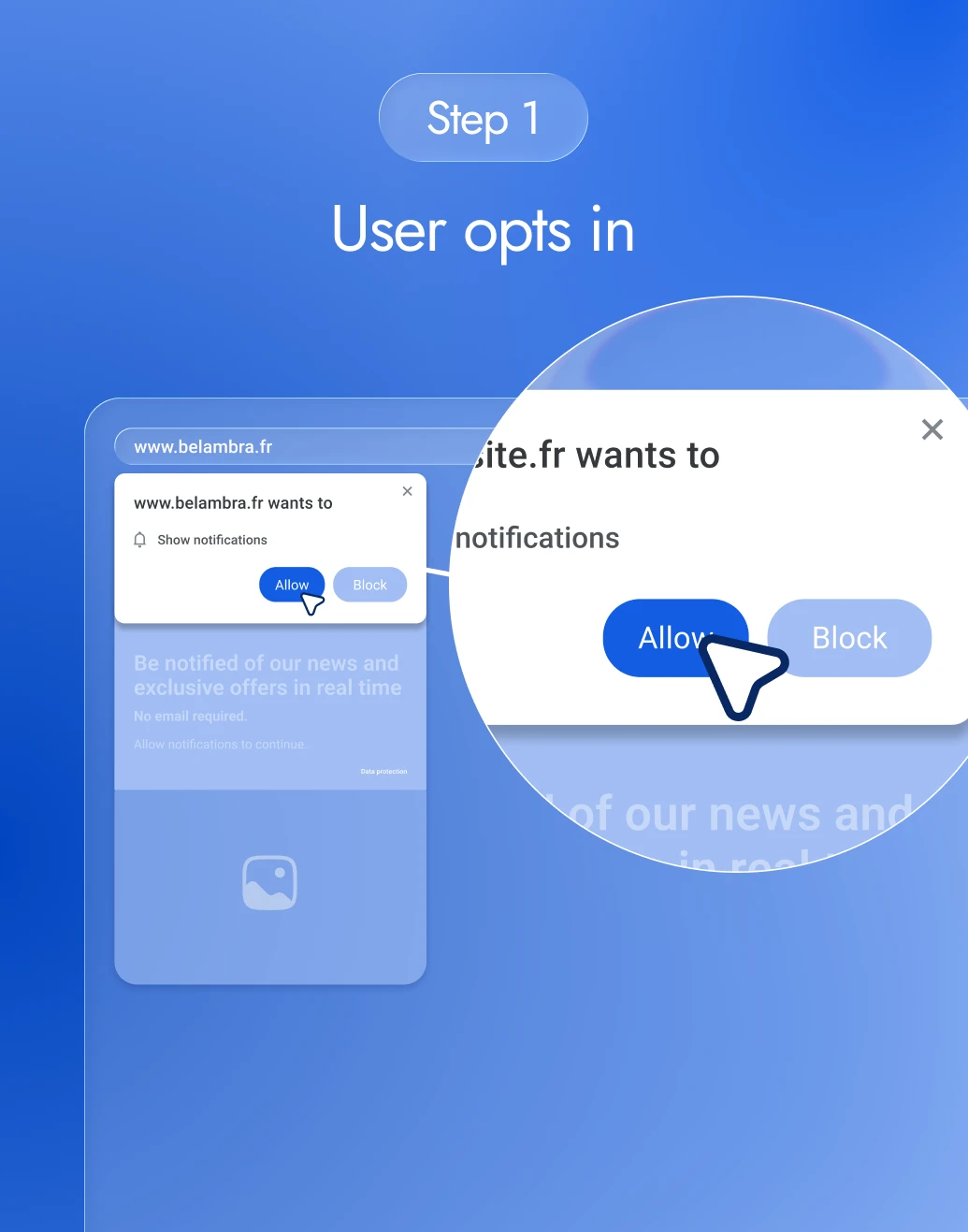
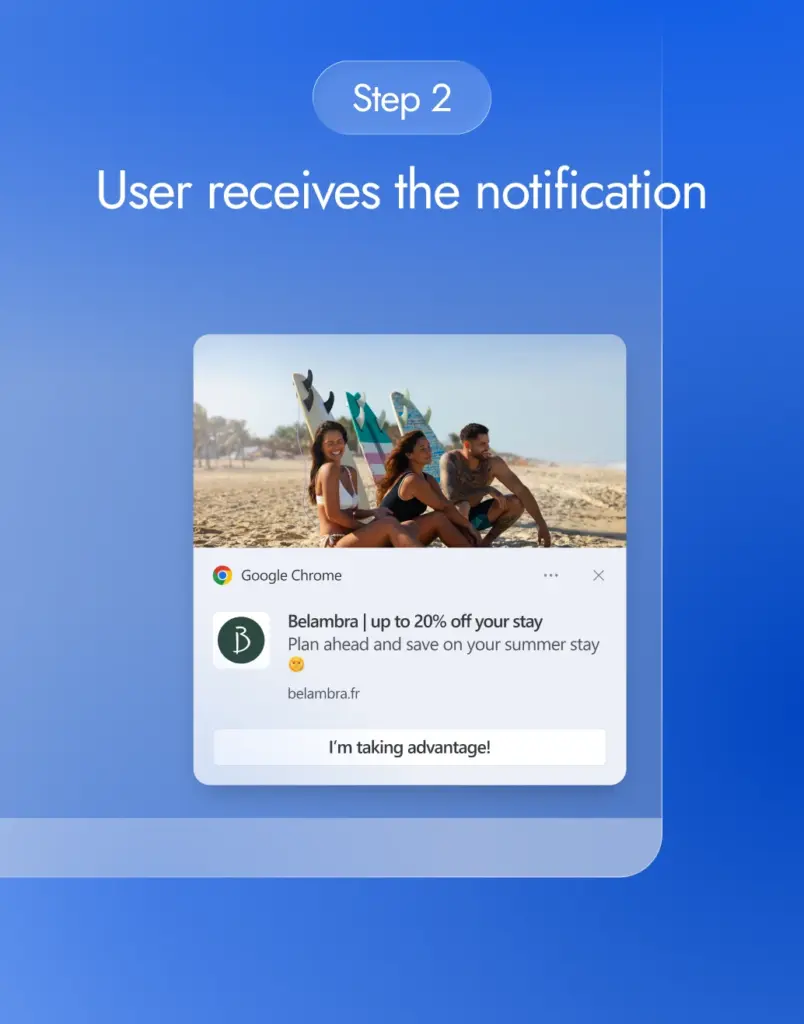
The opt-in principle
For a user to receive your push notifications, they must first give their consent.
For Push Apps, the user gives his consent when installing the application.
On the web, this takes the form of a small window (browser pop-up) that appears when the user visits the site, offering « Authorize notifications ». If the user accepts, he becomes a subscriber and joins the base of the sending site. Without consent, no notification can be sent, guaranteeing permission-based marketing (especially as the browser acts as a trusted third party to gather consent).
Note that on a media site that monetizes its audience via push web, the surfer may be offered the possibility of receiving notifications from the site and its partners – if he accepts, he will receive not only the publisher’s news, but also selected advertising messages via the advertising network that monetizes the publisher site’s audience.
Transmission and display
Once the user has opted-in, the principle is similar, whether via a mobile application or a web browser. The message is sent by the push server to the system’s notification service (Apple APNs, Google Firebase Cloud Messaging, etc. for mobile, or the browser’s push service for web). This service then transmits the notification to the user’s terminal, where it is displayed in the system’s native interface (notification center, lock screen, top banner, etc.).
For example, on a cell phone, a push notification appears as an alert on the lock screen or as a banner at the top of the screen. On computers (desktop browsers), it generally appears at the bottom of the screen (bottom right corner under Windows) to grab attention. The user experience is fluid: neither the application has to be open, nor the website browsed, for the message to be delivered.
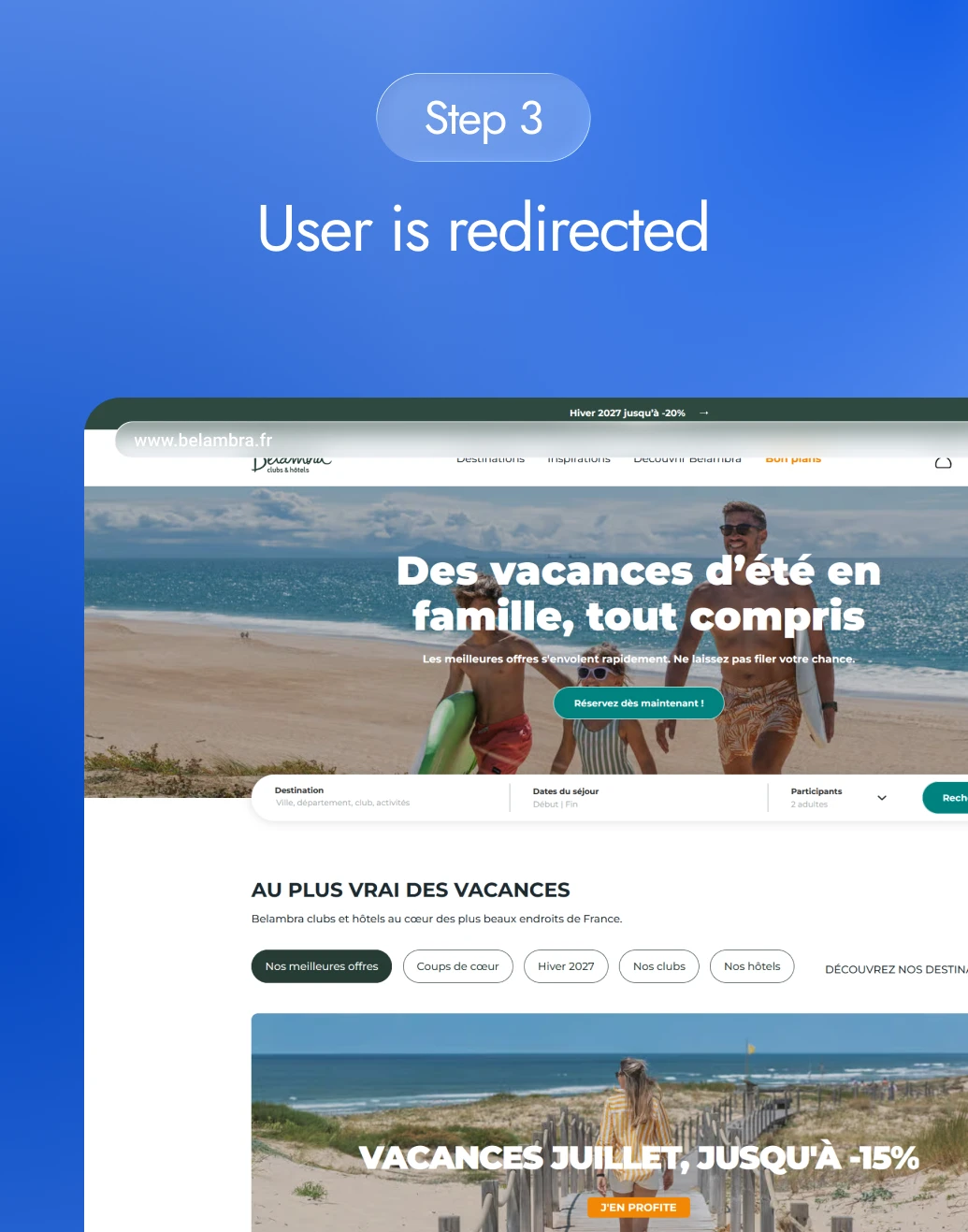
Click and redirect
Each notification contains a URL or deep link. If the user clicks on it, he or she is redirected to the intended destination – for example, the highlighted product page or item, or the application that opens on the appropriate view. The loop is thus complete: the push has brought the user back to your content or offer. It’s then up to the user to carry out the desired action (reading, purchasing, registering, etc.).
Users remain in control of their notifications: they can deactivate them at any time (via their browser or phone settings), which underlines the importance of sending relevant messages and not abusing their trust.
Compatibility

A web push notification is today supported by most modern browsers – Chrome, Firefox, Edge, Opera and Safari – on both desktop and Android mobile. Since 2023, even Safari on iOS has been able to receive web push notifications, extending the reach to iPhones previously excluded from this technology.
In parallel, classic push notifications have existed on mobile apps (iOS, Android, etc.) for over a decade, and are managed by services specific to each OS (APNs since 2009 for Apple, Firebase/FCM for Google, etc.).
Depending on whether or not you have a dedicated mobile application, you can therefore reach your customers via one or the other approach, or even both: the important thing is to integrate push mechanics into your omnichannel strategy to multiply contact points.
Push web vs. in-app: it should be noted that there are also so-called in-app notifications, displayed within an application when it is opened (for example, a contextualized message in an app’s interface). These do not require the user to go through the system’s push service, but do not reach the user outside the active application.
Web push notifications, on the other hand, reach the user even if they’re no longer on your website or app, making them a particularly powerful channel for retargeting your audience after their visit. What’s more, web push notifications require no app: any visitor to your site can become a subscriber with a single click. This accessibility makes it invaluable for players who don’t have a mobile app, or who want to extend their reach beyond their app users.
Why use web push notifications in your communications?
Web push notifications have established themselves as an essential digital communication lever, thanks to their many advantages:
Instant, direct communication
A web push notification is displayed in real time directly on the user’s screen, offering immediate contact that’s impossible to miss. Unlike an email, there’s no risk of it getting lost in a saturated inbox or filtered as spam. The result: click-through rates for push messages are up to 2 times higher than for traditional email marketing.
High opt-in rates
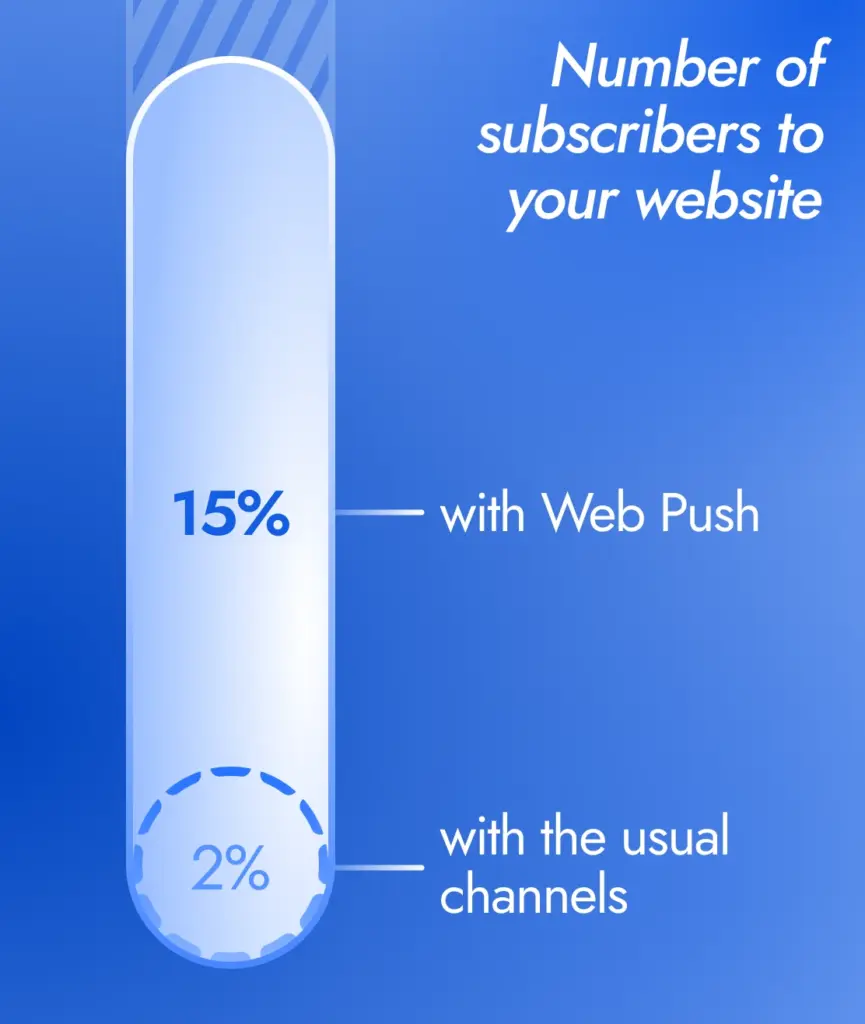
On average, around 15% of a site’s visitors agree to receive web push notifications. That’s an opt-in rate 15 times higher than that of an e-mail newsletter. This performance is due to the simplicity of the subscription process (one click, no form to fill in). For a brand, this means turning a significant proportion of its traffic into a subscribed audience that can be retargeted at a later date.
No personal data required
Subscribing to a push notification requires no email address or telephone number – just authorization via the browser. This channel is therefore minimally intrusive, and the collection of explicit consent guarantees compliance with the RGPD. What’s more, the web user retains control since he or she can unsubscribe at any time, in complete autonomy. For the advertiser, it’s a way of retargeting otherwise lost visitors, without breaching privacy rules.
Not subject to adblocking or spamming
As web push notifications are delivered by the browser‘s push service, they bypass ad blockers and spam filters. This means you can reach audience segments inaccessible via conventional banners or email, and maximize your reach. The push format doesn’t interrupt the user’s navigation on a given site – it’s displayed outside the site – making it less intrusive and preserving the user experience.
Control of marketing pressure
The brand has complete control over the frequency and content of its messages. This lever preserves the brand’s image, avoiding uncontrolled over-solicitation (no risk of irritating users with invasive pop-ups, since they themselves have authorized notifications). Best practice consists in segmenting and personalizing mailings, to bring real added value to the user – which translates into increased loyalty.
Marketing power and new revenues
Web push notifications enable users to stay in touch from the very first visit, and to return with subsequent content or offers, with a strong impact on loyalty. For example, Adrenalead notes that a well-executed push strategy can generate 10-15% more recurring traffic to a site, boosting conversions and advertising impressions. In addition, thanks to push ad networks, a brand can target users beyond its own site – including those who have never visited it before – and thus acquire new, qualified prospects. For content publishers, this format opens up a new off-site monetization channel, bringing in additional revenue without adding intrusive advertising space to their pages.
Web push notifications offer excellent marketing returns. They address a crucial digital problem: today, around 98% of website traffic evaporates without a trace (no leads collected or purchases generated). With just a few clicks, users can subscribe to push messages and become part of your database – a simple process that converts part of this lost « » traffic into an addressable audience. Feedback shows a significant improvement in the ROI of acquisition campaigns: fewer lost visitors, more conversions over time, and a relationship that lasts.
The place of web push notifications in the conversion tunnel
Beyond the theory, how can you make the most of push notifications in your marketing strategy? Here are a few key use cases for push notifications throughout the buying journey:
Acquisition of new prospects
Examples of Web Push notifications for acquiring new prospects

 Google Chrome
Push notifications can be used as a conquest lever to reach an audience that is not yet a customer. Some push web agencies offer advertisers the possibility of targeting profiles corresponding to their clientele (by interests, location, etc.), whether they have already visited their website or not. The sponsored push message is then delivered to opt-in subscribers of partner sites, and redirects these new visitors to the brand’s site. This approach generates qualified traffic in real time and increases reach. Adrenalead, a pioneer in this field, has an exclusive network of over 60 million opt-in Internet users – a significant acquisition potential.
NB: if you’re a media publisher, you can monetize your audience by sending them push notifications, generating additional revenue for you.
Convert anonymous visitors into leads
Examples of Web Push notifications for converting anonymous visitors into leads
 Google Chrome
On your own site, a push notification is an effective tool for capturing visitors from their very first visit and not « letting them go » without a point of contact. Where getting an email can be a hassle (many visitors are reluctant to fill in a form), push subscriptions offer a one-click alternative. On average, 10-15% of visitors click on « Authorize » and join your database – allowing you to retarget them at will. This is particularly useful in e-commerce, where it’s estimated that nearly 70% of shopping baskets are abandoned before purchase. With push notifications, you have the opportunity to re-target these undecided customers at a later date, rather than letting them leave your site without leaving any contact details. In this sense, push notification plays a role in activating the anonymous visitor into a qualified lead or buyer, improving the profitability of your traffic acquisition investments.
Audience engagement and loyalty
Examples of Web Push notifications for audience engagement and retention
 Google Chrome
Once your audience has subscribed, there are plenty of ways to keep in touch. You can plan push campaigns to share editorial content (blog posts, news, tips) to keep your readers/prospects interested. On the marketing side, you can send personalized promotional offers, discount codes, inform about a new product launch or an upcoming event. These messages create regular points of contact that bring the surfer back to your site and maintain brand awareness. For example, an online fashion site could alert its push subscribers to the arrival of the new spring collection. A news medium could send its latest breaking news to generate visits, and a retailer could promote its weekend flash sale by encouraging people to take advantage of it immediately.
The important thing is to deliver added value or useful information to the user: used in this way, web push notifications become a powerful loyalty-building tool (“nurturing”) that encourages your prospects to return more often, building a lasting relationship. For example, as soon as a new article is published, a daily or weekly newspaper can instantly notify its subscribed readers, significantly increasing traffic to recent content and even helping to improve SEO and Google Discover rankings.
Relaunching and converting the undecided
Examples of Web Push notifications for re-engaging and converting inactive users
 Google Chrome
Push notifications excel in retargeting and conversion scenarios. You can set up automated campaigns, triggered by user behavior: for example, send a push reminder 1 hour after a shopping cart abandonment in e-commerce. The message can recall the product left behind and offer an incentive (such as free delivery or a special time-limited discount) to encourage the user to complete the order.
Similarly, for a travel site, a user who has abandoned their search for a flight/hotel could be recalled with a notification « Last seats at -30% ». The possibilities are numerous: return to a visitor who has consulted a product sheet without purchasing, offer a catch-up discount after the end of an offer, or simply send a reminder (« There are still items in your basket ») to bring the user back to the site. These push reminders, acting on the spot or almost immediately after the observed behavior, often achieve excellent conversion rates – all the more so as the user doesn’t need to be watching their emails or be on the site to see the message. Properly orchestrated (with the right timing and relevant content), they can recover some of the lost sales by converting prospects who would otherwise have missed out on the offer.
Customer service and post-purchase loyalty
Examples of Web Push notifications for customer service and post-purchase retention
 Google Chrome
The customer journey doesn’t end with the initial conversion. Push notifications can also be integrated into a CRM strategy to nurture post-sales and foster loyalty. For example, sending a welcome push notification (possibly accompanied by an offer) to new subscribers to thank them for their trust helps to kick-start a positive relationship. After an order has been placed, a confirmation or tracking notification can reassure customers that their purchase has been taken into account, and keep them informed when the parcel has been dispatched.
A few days later, a push can solicit feedback on the product or purchasing experience, to show that we care about the customer’s satisfaction and generate UGC content. We can also anticipate the re-purchase of consumable products: for example, send a notification « It may be time to recommend your coffee capsules » one month after the initial purchase. This type of message maintains a useful link and generates repeat business. Finally, as part of a loyalty program, push notifications can be used to inform customers of available rewards (« Your loyalty points give you -10% off your next purchase »), exclusive private sales, or invitations to VIP events. Used in this way, push notifications reinforce the sense of belonging and increase customer lifetime value (CLV) by multiplying opportunities to return to the brand.
Examples by sector
All sectors can benefit from web push notifications by adapting them to their specific challenges. In the fashion/beauty sector, for example, they can be used to announce new collections, clear end-of-season stock or promote tutorial tips via the blog. On the travel/tourism side, push notifications can be used to announce a lightning promotion on flights, inform of changes (e.g. health protocol, weather) or propose offers according to the destination consulted.
In financial services (banking & insurance), push notifications can be used to stay in touch with consumers who are less and less present in physical branches: personalized financial advice can be distributed, product offers (credit, insurance) can be pushed following online simulations, or users can be invited to make an appointment with their advisor (drive-to-store logic). In the retail sector, we can communicate about new products or upcoming promotions.
As you can see, there are many uses for push notifications, and they can be adapted to each industry – whether to generate qualified leads, stimulate engagement or increase sales, it’s important to identify the key moments in the user journey where a web push message will bring value.
Best practices push notification « Drive-to-Store »
Drive-to-Store push notification best practices
Segment your audience precisely: radius in kilometers, product preferences, browsing history.
Target your entire base with the same “one-size-fits-all” message.
Personalize the content: city name, stock availability, local weather, countdown.
Send a generic push notification with no local added value.
Control marketing pressure: 1 to 2 notifications max per week per user, except for short campaigns.
Blast subscribers several times a day: high unsubscribe risk.
Test & optimize: A/B test the hook, time slot, icon or emoji, then adjust based on CTR and incremental visits.
Run the same creative for 3 months without analyzing performance.
Track incrementality: unique coupon or QR code, dedicated UTM, unexposed control group.
Stick to “sent / click” metrics without connecting them to in-store sales.
Web Push Notification: the new innovative communication channel you need to try now
By addressing key challenges such as real-time communication, audience retention, and new lead acquisition, web push notifications have established themselves as an essential tool in modern digital communication strategies. Positioned between display advertising and native formats, this channel offers brands a unique way to reach their audience on-device, in a personalized and consent-based manner. E-commerce sites, content publishers, and advertisers across all industries can benefit from it: increased repeat traffic, additional conversions, improved engagement… and even a new source of ad revenue for those with a sizable web audience.
In short, a successful web push notification strategy relies on a mix of planned campaigns (sent at specific dates/times) and automated campaigns triggered by user behavior (cart abandonment, welcome push, re-engagement sequences, etc.). It’s also highly recommended to segment your audience—for example, by targeting recent prospects differently from older inactive subscribers—and to personalize the content as much as possible to increase the relevance of each message. Finally, keep an eye on your sending frequency and unsubscribe rates: the goal is to strike the right balance between staying top of mind and avoiding user fatigue. If the content is useful and the communication cadence is reasonable, users will see your push notifications as a service, not a disturbance—turning this channel into a sustainable asset in your digital marketing toolkit.
Adrenalead — the solution that helps you (re)connect with your audience
Adrenalead, the first web marketing platform dedicated to activation via Web Push Notification, and equipped with its own advertising network, has played a leading role in democratizing this channel in France. Its proprietary technology and a network of over 60 million subscribers enable advertisers to run Web Push campaigns within a user-respectful ecosystem, using a “Choice-First” format based on explicit consent. Whether you’re looking to retain your current audience or acquire new customers, Web Push Notification offers a powerful and innovative playground to boost your marketing performance.
Ready to get started?
At Adrenalead, we’re with you from day one — from the first demo to campaign optimization, including setup support and best practice guidance — to ensure you unlock the full potential of Web Push Notification.
In just a few days, you too could start turning a share of your visitors into push subscribers and build an ongoing relationship with them — boosting your marketing performance while respecting your users. So… are you ready to hit “Push”? 🚀
Try out the Web Push revolution
NOW!

Advertisers
5,000 free SaaS subscribers

Publishers
100% free solution

Agencies
Free reach estimate & audit